Privacy settings

Keeps it rolling.

The All-in-One Mobility Solution for your fleet.

Claims, breakdowns, defects, violations, vehicles, partners and costs. Fleet, drivers, insurers, underwriting agents (MGAs) and service providers on the same case.

Line map (illustration): claim, breakdown, defect and violation run into one process. Along the stations Report, Review, Partner selection, Approval, Settlement and Closure, the fleet, driver, underwriting agent (MGA), service providers and insurer get on and off again.ClaimBreakdownDefectViolation01Report02Review03Partner selection04Approval05Settlement06Closure Line map (illustration): claim, breakdown, defect and violation run into one process. Along the stations Report, Review, Partner selection, Approval, Settlement and Closure, the fleet, driver, underwriting agent (MGA), service providers and insurer get on and off again.ClaimBreakdownDefectViolation01Report02Review03Partner selection04Approval05Settlement06Closure
Who gets on

01Process

One case, step by step

The line map shows who gets on. Here you see the process for each case type: who comes in when – and where Clamio gives the cue.

Example process (illustration)

    Stations as in the line map. Not every case type stops at every station.

    02Workflow

    The workflow steers,
    people decide

    Clamio orchestrates. Everyone pitches in.

    The fleet or the MGA maps recurring processes as a graphical process chain: one process for claim, breakdown, defect and violation. Like cases are handled alike, and every step is documented.

    All about automation

    Example process Illustration · simplified
    Trigger ClaimBreakdownDefectViolation

    A case is only closed once no orders or invoices are open.

    Step 3 · Partner selection

    The right partner, by your rules

    Partner selection

    • Fixed partner
    • Preferred partner

    You choose partners as fixed or preferred partners. Requests go out at once, one after another or at the same time.

    If no partner is found

    Create manual interventionCreate order without partner

    Your own service providers without an account take part via a protected order link.

    Dispatch · try it out

    As soon as one partner accepts, the request is settled for the others. If one declines, the request to the others stays open.

    Checked and tested

    The check run finds gaps, the test run plays the process through on a test claim – before go-live.

    Every run in the file

    The “Workflow” tab in the claim file shows every step, every result and every waiting time. Workflows start automatically. For claims, admins can also start or cancel a process by hand, traceably logged.

    Starts with the report

    As soon as a report comes in, the process starts. Requirement: Automation booked.

    Your guidelines, binding

    The workflow applies your settlement guidelines consistently.

    03AI

    Clamio suggests, you decide.

    AI helps with reporting and reviewing. On damage photos Clamio marks detected damage and lists the damaged parts with damage type. You verify or correct the suggestion.

    Illustration

    Drawn damage photo of a van from the driver’s side. Two frames mark the detected damage: A on the sliding door, B on the driver’s door.AB

    AI Analysis

    Damage Detections

    • Dent
    • Scratch

    Damaged Parts

    • Left sliding door
    • Driver’s door

    Clamio suggests. You decide.

    Illustration to try out. Dashed means suggestion, solid means verified.

    Damage photos and documents are stored in data centres in the EU, retrievable only via protected links that are valid for a short time. Detection runs in our own environment in the EU, without an external AI provider.

    More about AI

    04The file

    One file instead of ten conversations

    The driver reports, the partner repairs, the MGA settles, the insurer approves. Everyone works on the same cases, and each sees only their own section.

    Many ways to report, one file

    • Driver appguided report with photos, also as a draft
    • Portalfleet and MGA record the full case
    • Integrationreport via interface
    Claim fileView: Fleet portal
    Illustration
    • Course of events, photos, status
    • Driver data
    • Documents
    • Claim amounts and costs
    • Reserve and coverage decision

    The same file, as seen by

    Coordination in the file

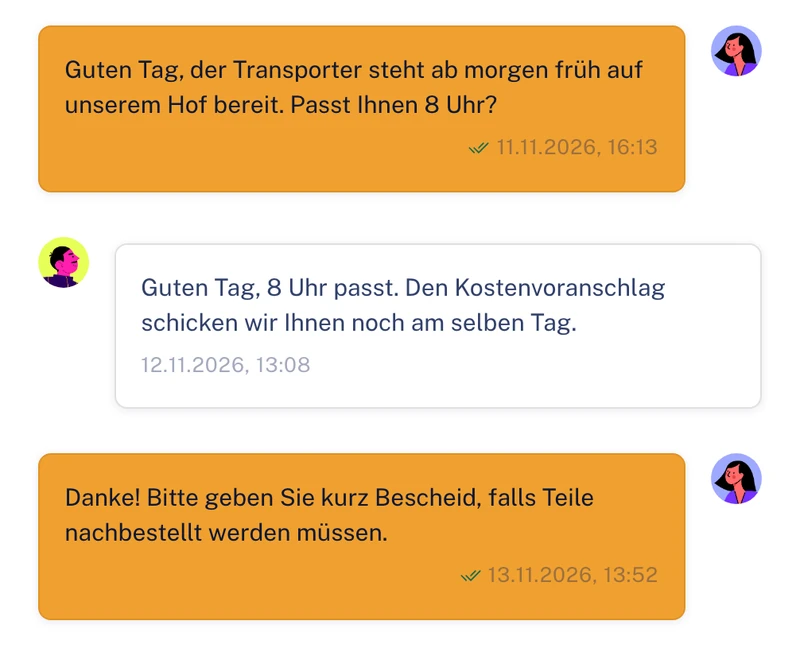
    Chat, tasks and documents sit in the file. You share documents selectively with individual parties.

    Fully traceable

    Changes to cases, approvals and data sharing are in the audit log, with person and time. You can filter and export the audit log.

    No case is forgotten

    Clamio reminds you of deadlines. A case is only closed once no orders or invoices are open.

    05Platform

    Five areas, one platform

    From the report through review, approval and settlement to closure. Five stations on the same line – here is the real interface, area by area.

    Go to page Cases
    • A structured file from report to closure – with photos, parties involved, vehicle and contract.
    • If it turns out to be a claim, you convert the breakdown (add-on module) or defect (add-on module) into a claim.
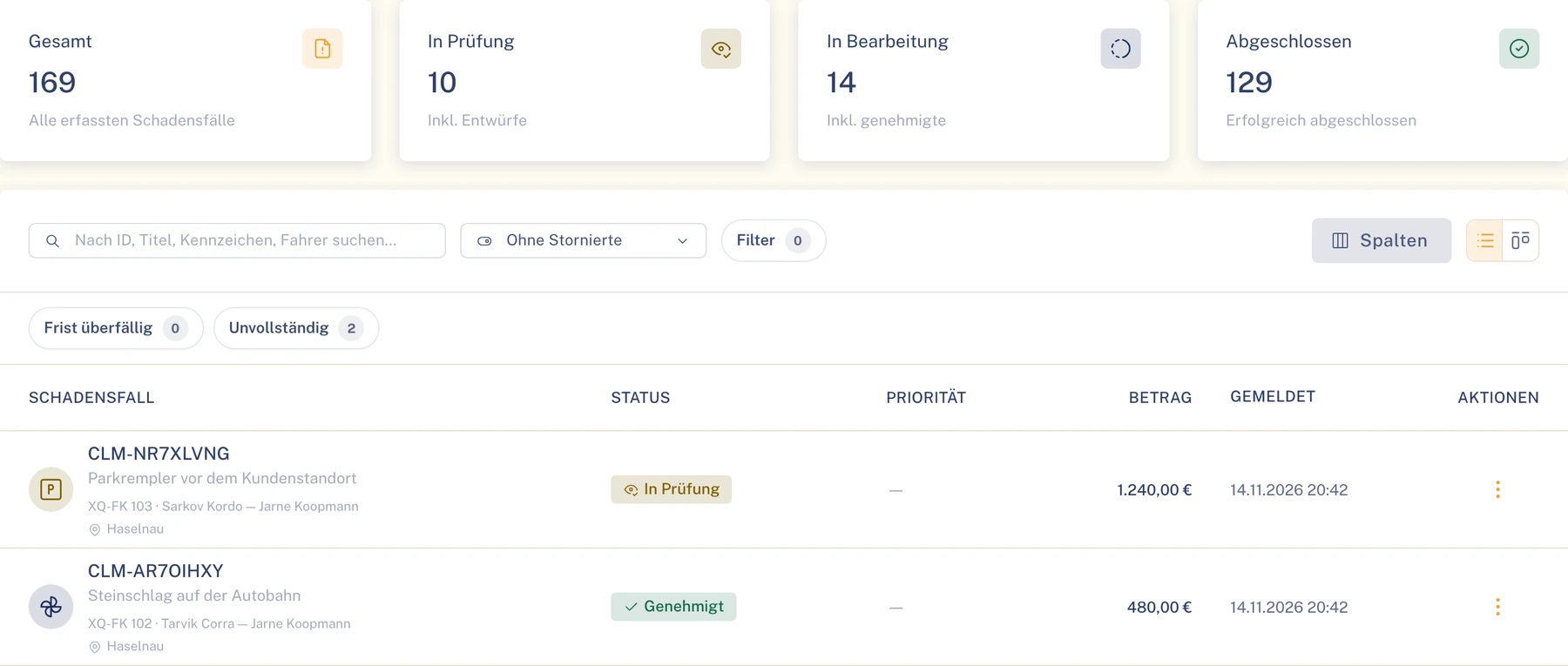
    Claims list in the Fleet portal
    The claims list with key figures, search, filters and status per claim. Demo data.
    Go to page Vehicles & drivers
    Go to page Collaboration
    Go to page Finance
    Go to page Automation

    06Solutions

    Every role a line, each in its own portal

    Everyone has their part in the case and their own portal for it. The colour shows where you are.

    Fleet portalCases, vehicles, contracts, deadlines

    Claims, breakdowns, defects and violations in one place

    The Fleet portal brings cases together with vehicles, contracts and deadlines. Drivers report via the app, partners work in the same file.

    • Key figures on claims, costs, partners and fleet, matched to your role.
    • Define preferred partners and your own service providers.
    • Hand claims handling over to an underwriting agent (MGA) – with areas, level and term, revocable at any time.
    Your partreportsorganisesapprovescloses
    Solution for fleets
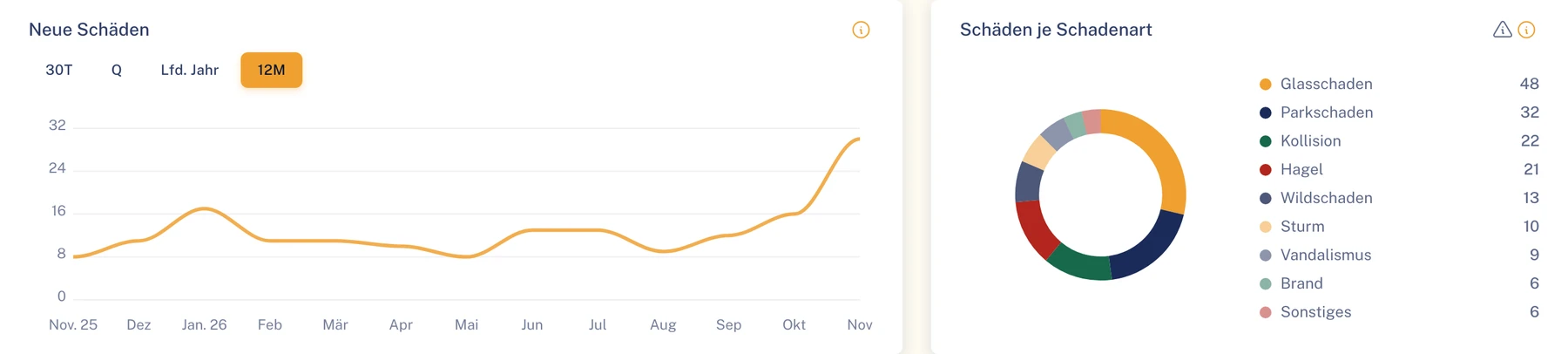
    Dashboard in the Fleet portal (section): new claims over the last 12 months and claims by damage type
    The dashboard in the Fleet portal. Demo data.
    MGA portalSettlement on behalf

    Settle on behalf of your fleets

    With delegated authority you work directly in the fleet’s data – in clearly defined areas. Your settlement decision carries the label “on behalf of”.

    Your partreviews on behalfcommissions partnersmanages the reserve
    Solution for underwriting agents
    • All fleets that have granted you delegated authority, with scope and status.
    • Full settlement, partial settlement, rejection or cost coverage, each documented with a reason.
    • If a delegated authority ends or changes, open approvals that the MGA may no longer decide go back to the fleet.
    Insurer portalShared cases

    Settle fleet claims together

    You work on the same files as the fleet and the MGA. You decide approvals, manage the reserve and set your coverage decision.

    Your partCoverage decisionapprovesreviews invoices
    Solution for insurers
    • A dedicated approvals inbox collects all approvals addressed to you.
    • The reserve with its complete history – reason, person and time of every change.
    • The review checklist (in preparation) gathers verifiable facts. You make the decision.
    Service provider portalsOrders when a claim occurs

    Five partners, each with their own portal

    Each partner works in their own portal and only sees the cases for which they have an order. Requests arrive in the portal and by email.

    Towing serviceAccept call-outs for claims and breakdowns and set the appointment. The driver sees the arrival time in the app.
    GarageAccept orders, submit cost estimate and invoice – glass specialists included.
    AssessorPrepare expert reports to order and deliver them straight into the file.
    Car rentalReplacement vehicle for a claim or breakdown: confirm the request, report the car as active and as returned.
    Law firmIn the file with the instruction, with documents and discussion. For a claim, the workflow can address approvals to the law firm, e.g. on settlement. Then the law firm decides.
    Solution for service providers
    Driver appfor iOS, Android and iPad

    The direct line to the driver

    Your drivers report claims, breakdowns (add-on module) and defects (add-on module) with photos, complete tasks and submit evidence. Costs and insurance decisions stay hidden.

    • In a breakdown the app immediately shows the cover on file, such as breakdown cover.
    • The daily overview shows appointments, deadlines and notices such as “Vehicle locked”.
    • No driver rankings, no scores, no telematics analysis.
    • The app interface in eight languages, for iOS, Android and iPad.

    Coming soon to the App Store and Google Play

    Your partreports with photoscompletes taskssubmits evidence
    Solution for drivers
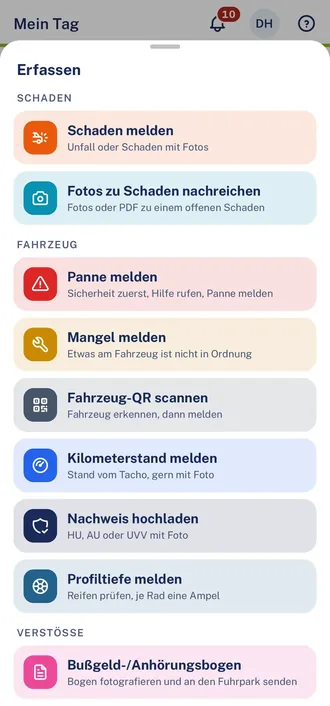
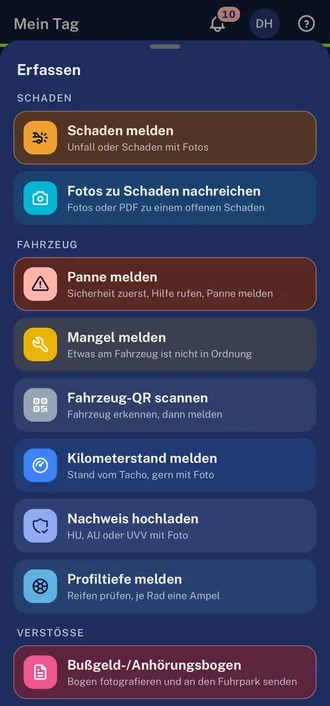
    Driver app, “Capture” sheet over “My day”: under “Claim” the entries Report a claim and Add photos to a claim, under “Vehicle” Report a breakdown, Report a defect, Scan vehicle QR code, Report mileage, Upload evidence and Report tread depth, under “Violations” Fine notice / hearing formDriver app, “Capture” sheet over “My day”: under “Claim” the entries Report a claim and Add photos to a claim, under “Vehicle” Report a breakdown, Report a defect, Scan vehicle QR code, Report mileage, Upload evidence and Report tread depth, under “Violations” Fine notice / hearing form, dark theme
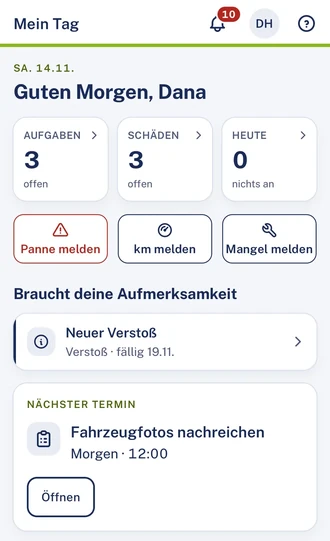
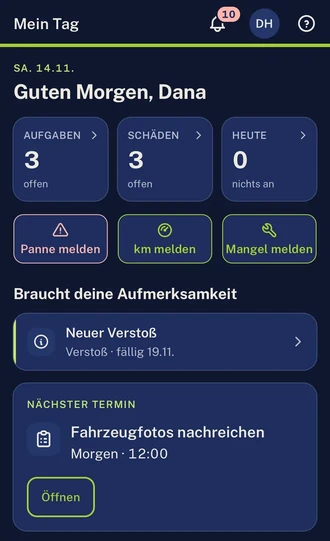
    Driver app, “My day” view (section): tiles for tasks, claims and today, with a new violation and the next appointment below.Driver app in dark mode, “My day” view (section): tiles for tasks, claims and today, with a new violation and the next appointment below.
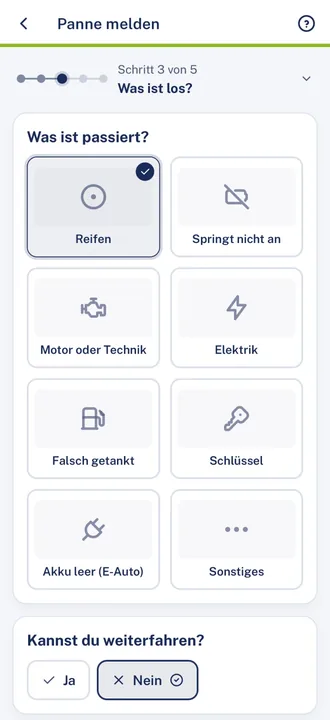
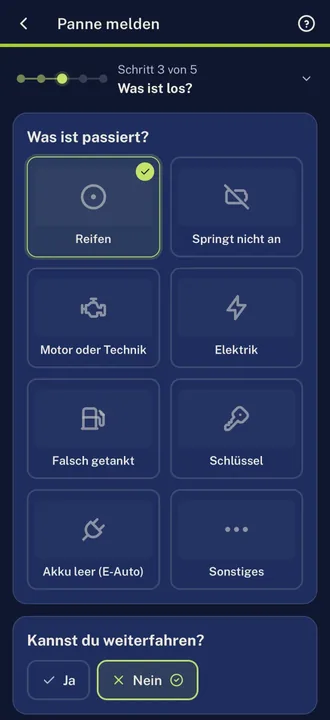
    Driver app, report a breakdown, step 3 of 5 “What’s wrong?”: under “What happened?” Tyre is selected, next to it Won’t start, Engine or mechanics, Electrics, Wrong fuel, Key, Battery empty (EV) and Other. Below, the question “Can you keep driving?” answered NoDriver app, report a breakdown, step 3 of 5 “What’s wrong?”: under “What happened?” Tyre is selected, next to it Won’t start, Engine or mechanics, Electrics, Wrong fuel, Key, Battery empty (EV) and Other. Below, the question “Can you keep driving?” answered No, dark theme

    08Security & data protection

    Everyone sees only their own section

    A finely graded role model governs who may see and do what.

    Location
    Data in the EU, encrypted in transitData stored in data centres in the EU. Connections are encrypted with TLS.
    Visibility
    Own cases and ordersEach organisation sees its own cases and those for which it has an order or delegated authority, or which it insures.
    Amounts
    Amounts only for those authorisedPartners only see amounts of their own orders and invoices; drivers see no claim amounts.
    Audit log
    Who, when, whatChanges to cases, approvals and data sharing are in the audit log, with person and time.
    Data protection
    Requests about your dataPlease address requests about your data to your fleet or to us. A function for this in the portal is in preparation.

    Security & data protection in detail

    Keeps it rolling.

    In a demo we show you what this looks like for your claims process.

    Prefer to see the workflow first? See the workflow