Platform · Vehicles & drivers
Who drove which vehicle when?
Vehicles, drivers and deadlines in one inventory, with assignment by period.
Clamio keeps the vehicle file and the driver file, reminds you of HU, AU and UVV and shows the driver in the app what is due for them.
Your inventory
- Vehicles
- Driver
- Contracts
- Deadlines
One inventory · Stations on this page
01Assignment
One vehicle, three drivers, one clear answer.
You assign drivers to a vehicle with from and to dates. Choose a day and see who had the vehicle on that day.
Illustration to try out · not a product image
One vehicle over twelve days
Day 7: Driver 2 has the vehicle.Assignment from day 5 to day 9.
Assignments of the vehicle
| Driver | From | To |
|---|---|---|
| Driver 1 | Day 1 | Day 4 |
| Driver 2 | Day 5 | Day 9 |
| Driver 3 | Day 11 | Day 12 |
- A change of driver is a new assignment.
- If several people drive the same vehicle, the assignment with its period shows who had it when.
- In the app the driver sees their current vehicle.
Drivers 1 to 3 and the days are examples. On day 10 nobody is assigned.
02Vehicle file
The vehicle file accompanies the vehicle until disposal.
Every vehicle has a status and a file. Its tabs show what is attached to the vehicle.
- You create vehicles, import them and organise them in groups.
- The life cycle has four statuses: active, sold, returned and decommissioned.
- “Mileage”, “Inspections” and “Cover” are tabs of their own, as are “Claims” and “Drivers”.
- You manage insurance contracts in the portal. Clamio reminds you when a contract ends.
- Tyre sets with tread and age limits and their own deadline for the change (add-on module).
From the interface
Demo data

03Driver file
The driver file holds what belongs to the driver.
Vehicles, claims, driving licences and documents are in one file. What changes in it is in the history.
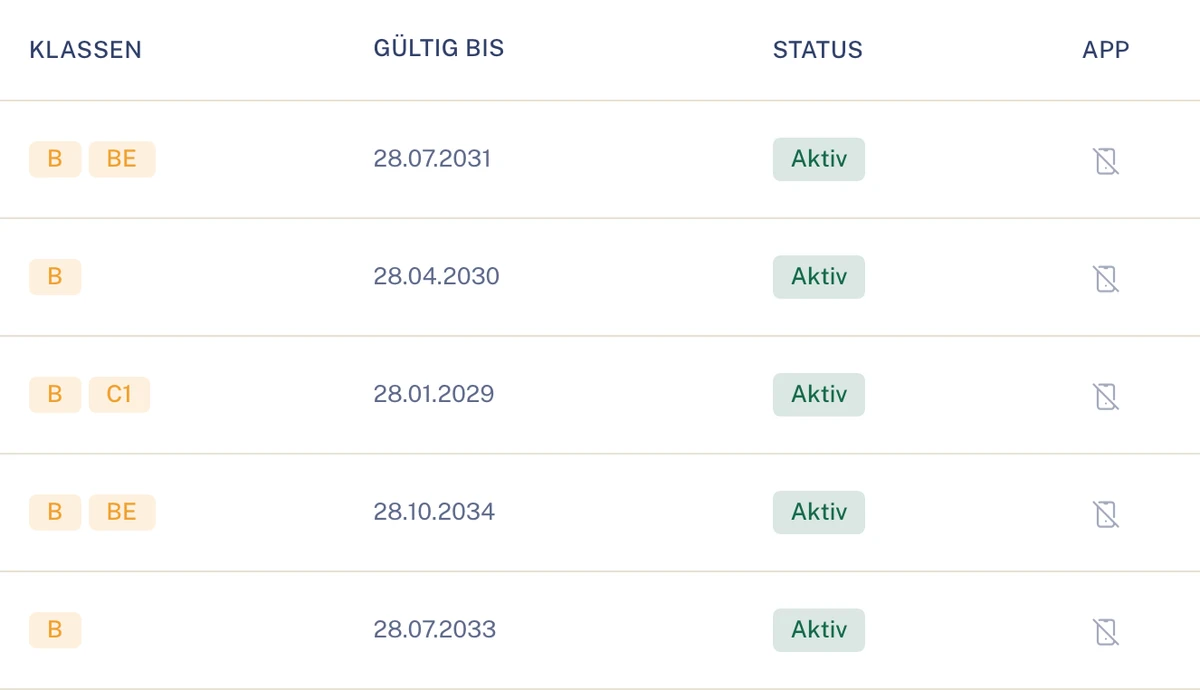
- The “Driving licences” tab lists class and validity for each licence.
- The deadline “Driving licence expires” appears before the time comes.
- You create drivers, import them and organise them in groups.
The driving licence in the appUnder “My driving licence” the driver sees classes, validity and status and receives a notice when it is about to expire.
From the interface
Demo data
04Deadlines
HU, AU and UVV: what falls due is shown in good time.
Clamio keeps the due dates per vehicle and reminds you ahead of time. How early, you set per inspection type.
- The same rule applies to your overview, the driver’s list and the reminder.
- The driver submits the inspection result in the app; the fleet confirms it.
- An expiring driving licence and the end of a contract also trigger reminders.
Illustration · A general inspection falls due
- Reminder ahead of timeFleet and driver see the due date.
- The driver submits the resultIn the app, as inspection evidence.
- The fleet confirmsIt checks the submitted result.
- Defect created add-on moduleOnly if the HU result is “dangerous” or “unroadworthy”.
05Lock
Locked until the fleet decides.
A lock applies to new assignments. Current assignments and orders remain in place.
After a report
For a critical defect or the statement “not drivable”. How the lock works.
By hand
You lock a vehicle yourself. The interface then shows “Locked by the fleet”.
On disposal
If a vehicle is sold, returned or decommissioned, Clamio locks it and creates a handover task for the fleet.
Whether a new assignment only warns or is blocked is set by your organisation. Depending on the source, the lock is called “Locked by the fleet”, “Defect on the vehicle”, “Breakdown”, “Provisional – driver report” or “Confirmed by the fleet”.
06Driver app
What concerns the driver is in their app.
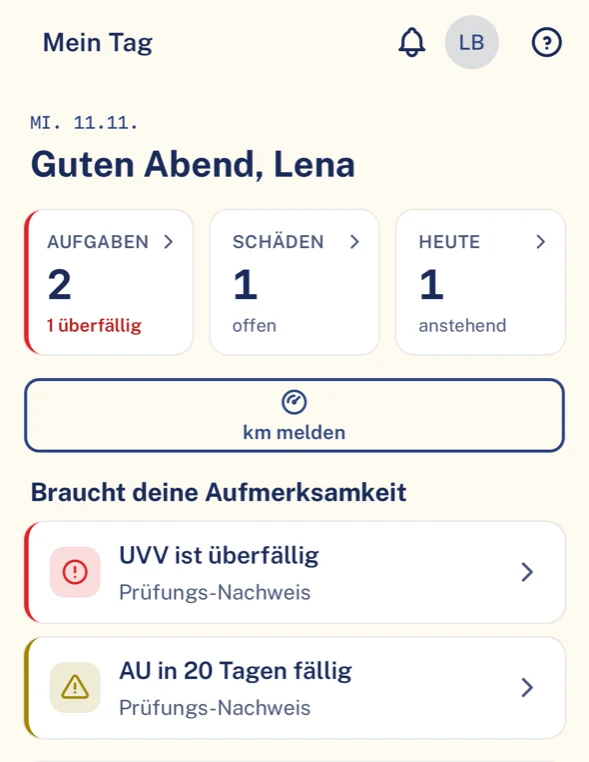
“My day” shows appointments, deadlines and notices. In addition there are the driver’s own vehicle, the mileage and the inspection evidence.
- The driver signs in to the app and only sees their own cases.
- The app interface is available in eight languages.
- It runs on iOS, Android and iPad, portrait and landscape.
- Several drivers can be signed in on a shared tablet. Notifications only go to the active driver.
- No driver rankings, no scores, no telematics analysis.
From the Driver app
Demo data
07Frequently asked questions
Quick questions
Tyres is an add-on module.Breakdown and defect likewise.
What happens when the driver changes?
You create a new assignment with from and to dates. The earlier assignment remains with its period. That way you can still see later who had the vehicle when.
Does Clamio show where a vehicle currently is?
No. Clamio does not locate vehicles and does not analyse telematics.
Can drivers submit inspection evidence themselves?
Yes. The driver submits the result of an HU, AU or UVV in the app. The fleet then confirms.
Can vehicles and drivers be imported?
Yes. You can import both inventories instead of creating each entry individually.
Clamio orchestrates. Everyone pitches in.
In a demo we assign a vehicle and show how a deadline reaches the driver.
And if something is wrong with the vehicle? See Cases