
Towing portal · For call-outs after a claim or breakdown
Towing after a claim or breakdown
If a vehicle has to be towed, the request reaches you in the portal and by email. You report the status; the driver sees the arrival time in the app.
- Accept or decline call-outs for claims and breakdowns
- Report status: dispatched, en route, delivered
- Set appointment: the driver sees the arrival time in the app
Starting point
What slows down the call-out today
Three places where things get stuck today, and what Clamio does there.
-
Call-out by word of mouth
The order comes by phone. You write down vehicle and location.
With ClamioRequests reach you in the portal and by email. With the order you see the vehicle, the accident location and whether it is drivable.
-
When will help arrive?
Driver and fleet call and ask about the arrival.
With ClamioYou set the appointment in the order. The driver sees the arrival time in the app, even if it changes.
-
Invoice without feedback
Whether the invoice has arrived and been reviewed, you only learn on asking.
With ClamioYou submit the invoice in the same portal and see its status through to “Paid”.
01Call-out
One call-out, your section
Each partner works in their own portal and only sees the cases for which they have an order.
- 01Report
- 02Review
- 03Partner selectionThis is where you get on
- 04Approval
- 05Settlement
- 06Closure
Claim and breakdown (add-on module)
If a vehicle is not drivable after a claim, towing is organised as an order. If a driver reports a stranded vehicle, the fleet commissions the towing service via Clamio.
Accept or decline
Requests reach you in the portal and by email. The fleet chooses in the process how partners are asked. At the same time: as soon as one partner accepts, the request is settled for the others. If one declines, the request to the others stays open. One after another: if one declines, the next is asked immediately, otherwise once the waiting time has elapsed.
What you see
Vehicle, accident location and drivability, plus Damage Arrival with description, photos and damage sketch.
Own amounts only
You see your own order amounts. Other amounts of the claim only as far as they are shared.
One file, everyone sees their own section.
 File · Towing service’s viewIllustrationYour section
- Your ordervisible: for a claim or a breakdown
- Vehiclevisible: that has to be towed
- Accident locationvisible: location of the vehicle
- Drivabilityvisible: drivable, yes or no
- Damage Arrivalvisible: with description, photos and damage sketch
- Amountspartly: your own order amounts, others only as far as shared
- Cases without an ordernot visible: do not appear for you
- Via order linknot visible: driver and cost data are not visible through it
Orders · Towing portalScreenshot
02Workflow
From call-out to invoicing
Your order is attached to the file of the case. You accept, report the status and set the appointment. Fleet and driver see when help is coming.
The fleet commissions via ClamioYou carry out the call-outThe driver sees the arrival time
Station 01 · Request
Accept with one click, after a confirmation prompt
Requests reach you in the portal and by email.
- The fleet chooses in the process how partners are asked. At the same time: as soon as one partner accepts, the request is settled for the others. If one declines, the request to the others stays open. One after another: if one declines, the next is asked immediately, otherwise once the waiting time has elapsed.
- Before accepting, the portal asks once: “Are you sure you want to accept this order?” The fleet’s claims handlers will be notified. When declining you can give a reason.
- You only see cases in which you are commissioned.
- Clamio
- reports the request in the portal and by email
- You
- accept or decline
Accept · Accept OrderScreenshot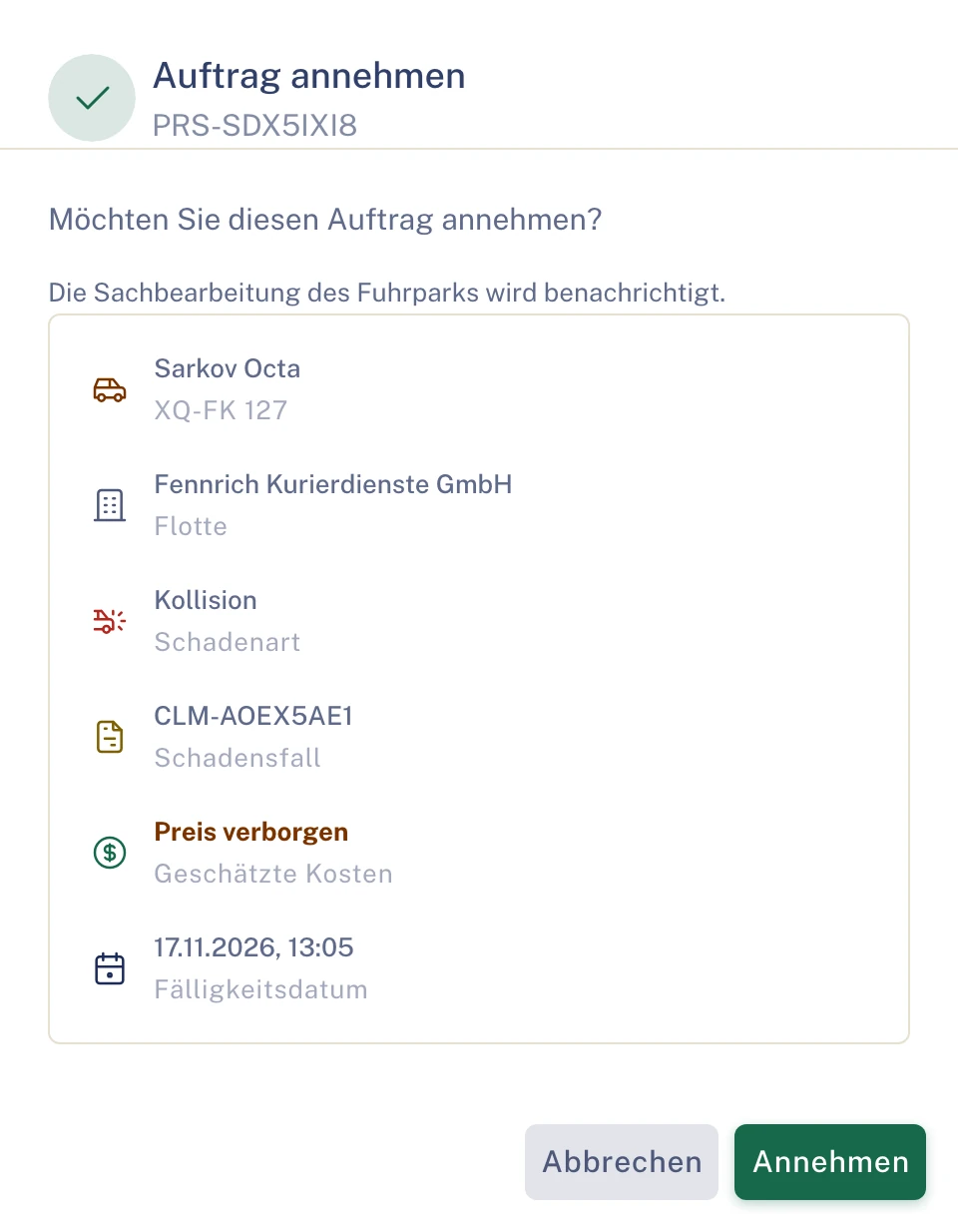
Station 02 · Call-out details
Vehicle, accident location, drivability
With the order you see the vehicle, the accident location and whether it is drivable. Damage Arrival shows description, photos and damage sketch.
- Your order is attached to the file of the case.
- You settle queries in the file instead of by phone, under the “Discussion” tab.
- Clamio
- shows you Damage Arrival for the order
- You
- see vehicle, accident location and drivability
Damage ArrivalScreenshot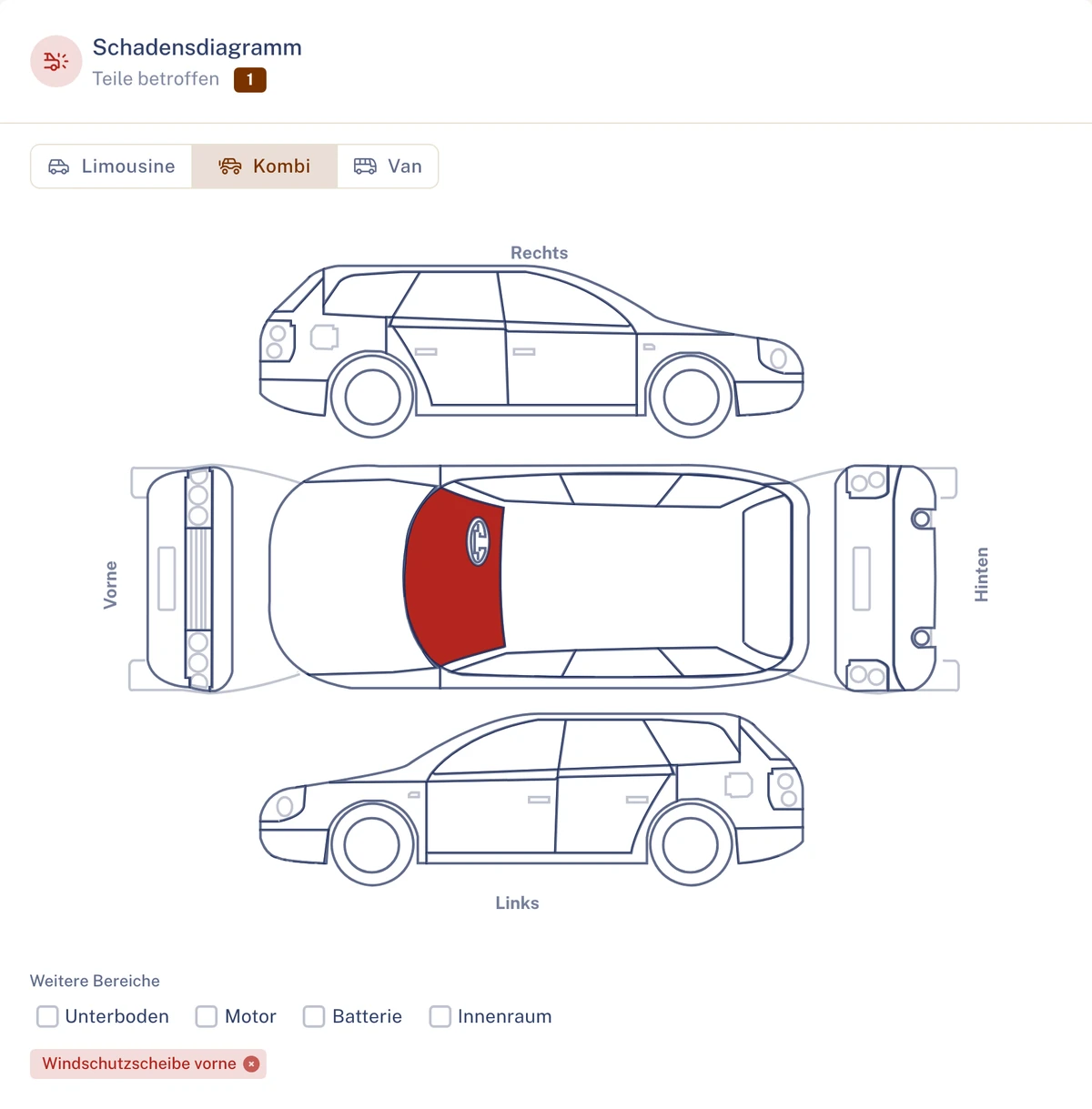
Station 03 · Status and appointment
You set the appointment, the driver sees the arrival time
In the towing history you report the status: dispatched, en route, delivered. After accepting, you set the appointment in the order. The breakdown’s arrival time follows this appointment.
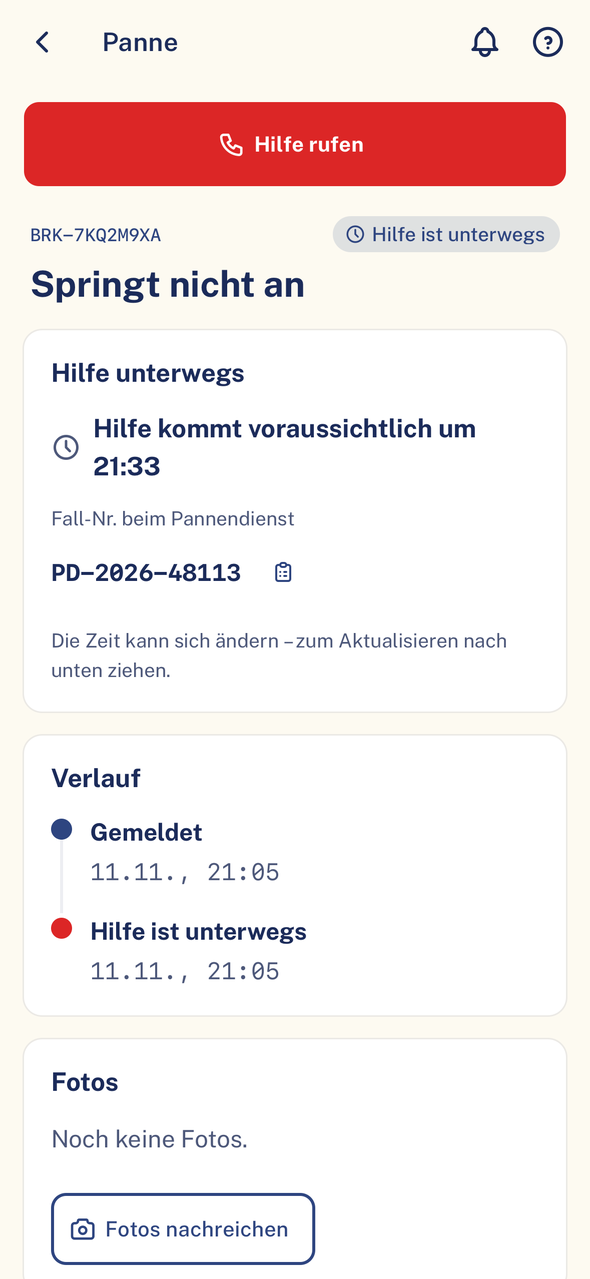
- The driver sees the arrival time in the app, even if it changes.
- The fleet sees the arrival time in the breakdown file and is notified.
- You can change or remove the appointment.
- Clamio
- shows fleet and driver the arrival time
- You
- report the status and set the appointment
Towing history · Status and appointmentIllustration Driver app
Breakdown
 Breakdown: new arrival time …
Your status in the towing history: En Route. Appointment set; the arrival time is shown in the Driver app.
Your steps do not automatically change the status of the help in the app. The time is a freely chosen example.
Station 04 · Delivered
Report delivered, enter the distance
Once the vehicle is delivered, you report the status. You enter distance and estimated costs on the order. You upload documents for the call-out to the file.
- Before every change, the portal asks once for confirmation.
- The towing history shows every step with time and trigger.
- Clamio
- keeps the towing history with every change
- You
- set the status to “Delivered”
Towing historyScreenshot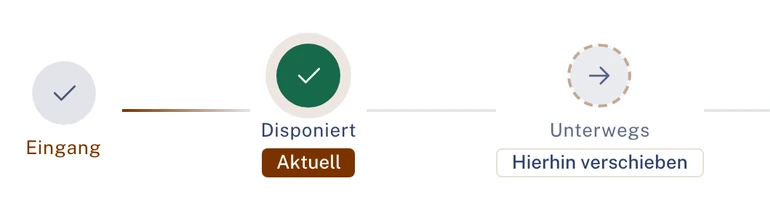
Station 05 · Invoicing
Invoice with receipt, status through to paid
You submit invoices with line items and receipt digitally in the same portal.
- The payer reviews the invoice and approves it.
- You see the status of your invoice through to “Paid”. You only see your own amounts.
- Clamio
- presents the invoice to the payer
- You
- submit the invoice with receipt
Order informationScreenshot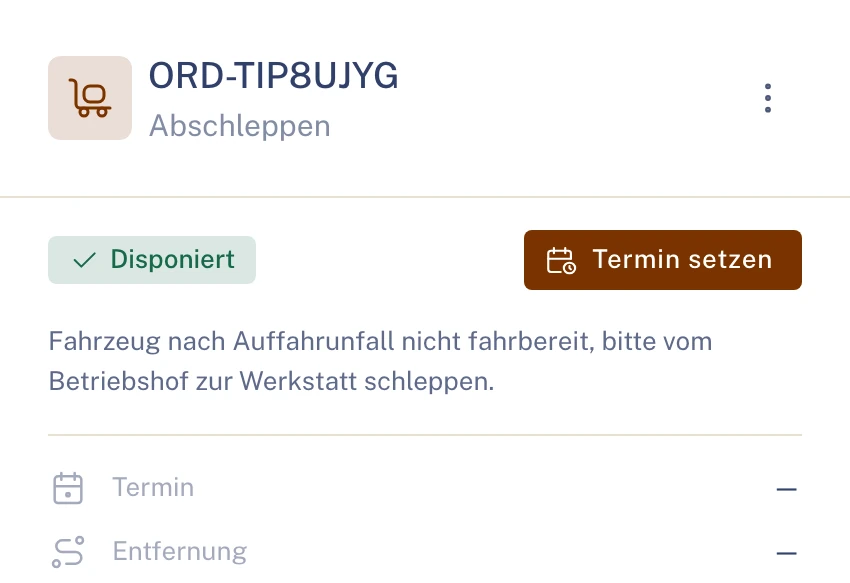
The towing history shows every step with time and trigger.
Who commissions
The fleet, via Clamio: from the claim or from the breakdown.
Who gets the call-out
The fleet chooses in the process how partners are asked. At the same time: as soon as one partner accepts, the request is settled for the others. If one declines, the request to the others stays open. One after another: if one declines, the next is asked immediately, otherwise once the waiting time has elapsed.
Who sees the arrival time
The fleet in the breakdown file, the driver in the app.
No amounts in messages
Messages to partners and drivers contain no claim amounts.
02.1Breakdown or claim
Two occasions, the same process
- If a vehicle is not drivable after a claim, towing is organised as an order.
- If a driver reports a stranded vehicle, the fleet commissions the towing service via Clamio.
- A breakdown can be converted into a claim.
Claim and breakdown, one towing order
IllustrationClaimVehicle not drivable
BreakdownDriver reports stranded vehicle
Towing orderin your portal, attached to the file of the case
Your order is attached to the file of the case, whether claim or breakdown.
03Driver
The driver knows when help is coming
The driver sees the arrival time in the app, even if it changes. It follows the appointment you set in the order.
Arrival time
You set the appointment in the order. The driver sees the arrival time in the app, the fleet in the breakdown file.
Status of the help
The app shows the driver the status of the help, from “Help requested” to “Towed”. Your steps in the towing history do not change it automatically.
Arrangements
You settle queries in the file instead of by phone, under the “Discussion” tab.
One call-out, three partiesIllustration- Driverreports a stranded vehicle with location
- Fleetcommissions the towing service via Clamio
- Towing service · Youaccept the order and set the appointment
- Driversees the arrival time in the app
- Towing service · Youreport “Delivered” and enter the distance
Example history of a breakdown, drawn without names and dates.
04Invoicing
Distance and invoice in the same portal
You submit invoices with line items and receipt digitally. The payer reviews and approves them.
Distance (km)
You enter distance and estimated costs on the order, in the “Order cost details” dialog.
Invoice
You submit it with line items and receipt in the same portal and see its status through to “Paid”.
Own amounts
You see your own order amounts. Other amounts of the claim only as far as they are shared.
Without an account
For service providers without their own account, the fleet records the invoice.
- Draft
- Submittedwith line items and receipt, in the same portal
- In reviewwith the payer
- Approvedor “Rejected”
- Paid
After invoicing you set the order to “Invoiced”.
Drawn without amounts.
05Collaboration
You tow, everyone works in one file
You work in the same file as fleet and insurer and only see what concerns your order.
FleetCommissions via Clamio
The fleet organises the help
If a driver reports a stranded vehicle, the fleet commissions towing service, garage or car rental via Clamio. It sees your arrival time in the breakdown file.
Solution for fleetsDriverReports via the app
The driver is not left waiting in the dark
The driver sees the status of the help and the arrival time in the app.
To the Driver app
Underwriting agent (MGA)Commissions on behalf
You see who has acted
The MGA’s settlement decision carries the label “on behalf of”.
Solution for underwriting agents


Other service providersOrders when a claim occurs
Each partner in their own portal
Garages, assessors, car rental providers and law firms work in the same file, each in their own portal.
Solution for service providersAlso in the Towing portal
- Calendar with appointments
- Discussion
- Documents
- Invoices
- Towing history
Without your own accountAs a fleet’s service provider you can also take part without your own account via a protected order link.
Own rolesTow drivers and accounting work with their own roles in the Towing portal.
Everyone sees only their own section
- Own cases and orders
- Each organisation sees its own cases and those for which it has an order or delegated authority, or which it insures.
- Own amounts only
- Partners only see amounts of their own orders and invoices.
- Data in the EU, encrypted in transit
- Data stored in data centres in the EU; transmission is encrypted (TLS).
Frequently asked questions
What towing services want to know in advance
Do I get call-outs for claims and for breakdowns?
Yes. You accept or decline call-outs for claims and breakdowns.
How does the driver learn when I am coming?
You set the appointment in the order. The driver sees the arrival time in the app, even if it changes.
Do my steps change the status of the help in the Driver app?
No, not automatically. The driver sees the status of the help and the arrival time in the app.
Where do I enter distance and costs?
You enter distance and estimated costs on the order.
Do I have to give a reason if I decline?
No. When declining you can give a reason; it is not mandatory.
How do I invoice?
You submit the invoice in the same portal and see its status through to “Paid”. After invoicing you set the order to “Invoiced”.
Does it also work without my own account?
Yes. As a fleet’s service provider you take part via a protected order link.
Demo
Get to know the Towing portal
In a demo we show you how towing orders from claims and breakdowns run in the portal.