Platform · Collaboration
One case.
Everyone sees their part.
Fleet, insurer, underwriting agent (MGA), service providers and driver work on the same file.
Orders, queries and tasks come together in the case. What an organisation sees follows its order or its delegated authority.
Who takes part
- Fleet
- Insurer, MGA
- Service providers
- Driver
One file · Stations on this page
01Visibility
Five cases. Who sees which?
Choose an organisation and see which of a fleet’s cases reach it and why.
Clamio orchestrates. Everyone pitches in.
Illustration to try out · not a product image
The garage sees 2 of 5 cases.It sees the cases for which it has an order, and of the amounts only its own.
- ClaimClaim 1visibleOrder to the garage
- ClaimClaim 2not visiblenot visible without an order
- Breakdown add-on moduleBreakdownnot visiblenot visible without an order
- Defect add-on moduleDefectvisibleOrder to the garage
- ViolationViolationnot visiblenot visible without an order
The rule behind it: each organisation sees its own cases and those for which it has an order or delegated authority, or which it insures. The five cases are examples.
02File
The order is attached to the file it comes from.
The fleet brings in parties and places orders. What the partner delivers is then in the same case.
- Partners report their status via the order status.
- The partner places cost estimate, expert report, photos and documents in the file.
- They submit the invoice in their own portal.
- You ask your own service providers without a portal via order link.
Illustration · An order to a partner
- Place orderFrom the file of the case.
- The partner answersAccept or Decline
- Report statusVia the order status, visible in the file.
- Submit invoiceIn the partner’s portal, for the same order.
03Discussion
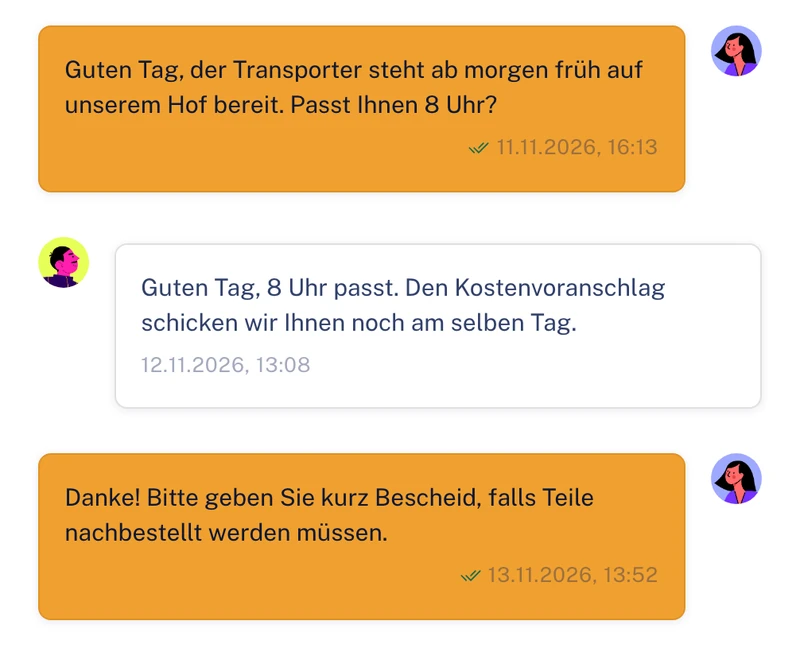
The query sits with the case, not in the mailbox.
Coordination with commissioned partners under the Discussion tab. Each partner only sees what concerns their order.
- In the Fleet portal the area is called “Communication”; the “Chat” is inside it.
- In the partner portal the same place is called “Discussion”.
- Clamio informs about news in the portal and by email, in the recipient’s language.
From the interface
Demo data
04Tasks
What needs doing has a recipient.
Tasks stand alone or are attached to a claim, a breakdown, a defect, a vehicle or a violation.
- Every task has a status, checklist, comments and reminders.
- It goes to a person or to an inbox, a team’s shared tray.
- You decide approvals from a workflow in the portal. The email only points to it.
Tasks for the driverThe driver sees their tasks in the app, ticks off items and completes them. From a workflow they only receive tasks for their claims, for example “Upload documents”.
Illustration · A task in the inbox
- Task createdOn its own or on a case.
- In the team’s inboxNobody has taken it on yet.
- “Take on”A person takes the task on.
- DoneThe status is on the task and on the case.
05Portals
Eight portals and one app for the same case.
Each organisation works in its own portal, with its own lists and its own statuses. The driver uses the app.
 FleetReports, places orders and keeps the overview.
 InsurerReviews submitted invoices and decides approvals.
 Underwriting agent (MGA)Works with delegated authority for fleets.
 GarageTakes on repair and glass orders.
 AssessorPlaces expert reports, supplements and photos in the file.
 Towing service (breakdown assistance)Carries out call-outs for claims and breakdowns.
 Car rentalSupplies the replacement vehicle after a claim or breakdown.
 Law firmTakes on cases for claims and violations.
 Driver app onlyReports on the road and completes their tasks.
06Permissions
Permissions follow roles. Access follows order or delegated authority.
Each organisation grants permissions via roles and can create its own roles.
- The delegated authority for the MGA applies per area, read or write. Without an area it has no access.
- Vehicles, claims and drivers are always included. Optional are contracts, users & settings, exports, own service providers, breakdowns and defects, tyres, and costs & invoices.
- An area only takes effect if the matching module is booked.
- The fleet grants it by authority code or at the MGA’s request.
- Partners see the amounts of their own orders. At the fleet, amounts are seen by those with the “Read costs” permission.
- Changes to cases, approvals and data sharing are in the audit log, with person and time.
07Frequently asked questions
Quick questions
Approvals from workflows require Automation to be booked.Orders, discussion and tasks do not need it.
Do partners see other partners’ cases?
No. A partner only sees cases in which they are commissioned. In the discussion they see what concerns their order.
Can we bring in service providers who do not use a portal?
Yes. You ask your own service providers via order link. You can record their invoices yourself.
Does an inbox give access to cases?
No. Membership of an inbox gives no access to data. It only shows tasks for cases you are allowed to see anyway.
How do I learn of a new task or message?
Through the notification in the portal and by email. You choose yourself which emails you receive; your organisation sets the default.
Keeps it rolling.
In a demo we open the same case twice: in the Fleet portal and in a partner’s portal.
How do partners get their orders? See partner selection